Spear Phishing Mistakes: 7 Errors That Bypass Security Filters
Attackers exploit human psychology and configuration gaps that standard email filters cannot detect, turning minor oversights into full system compromises.
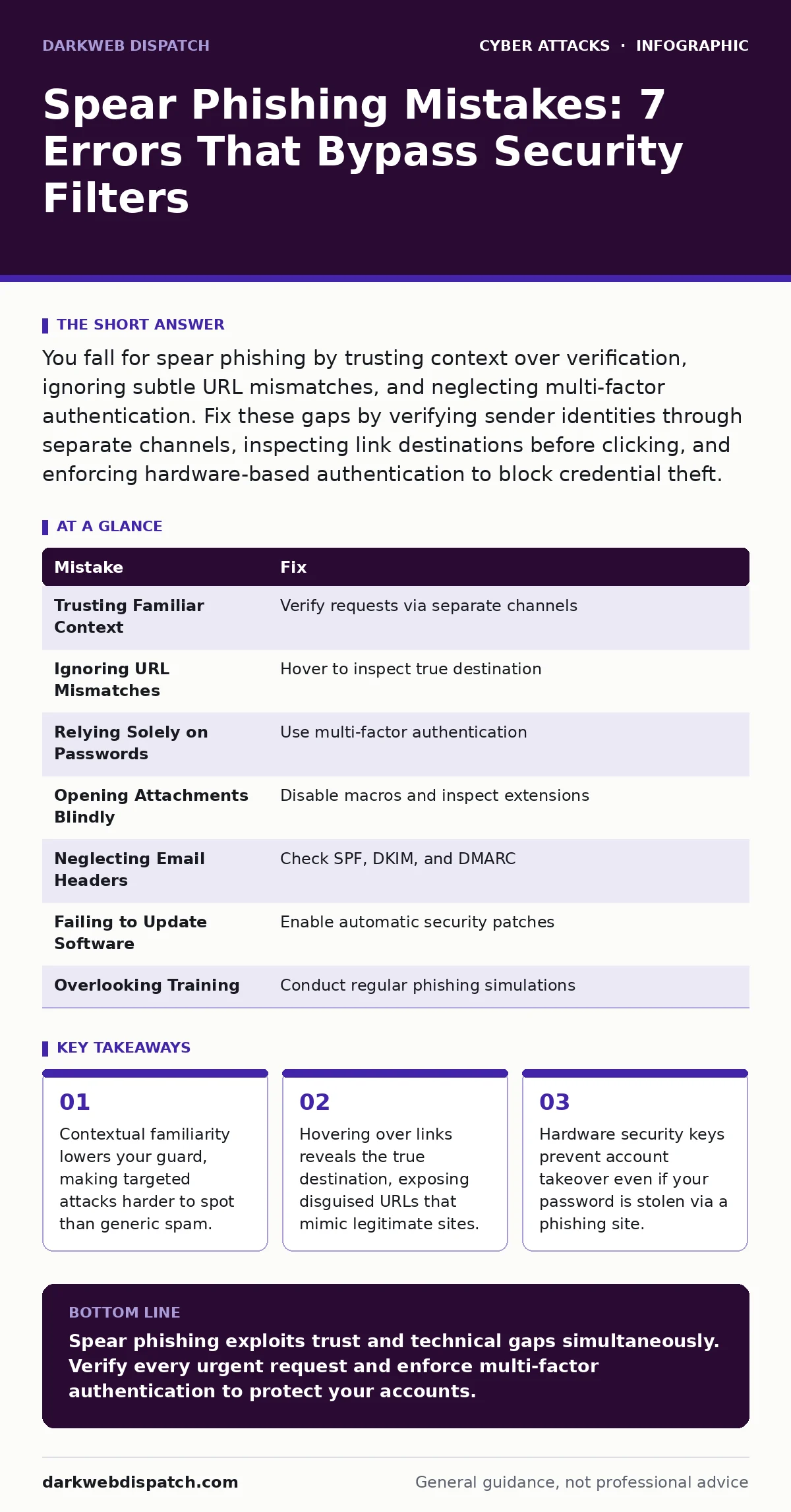
You fall for spear phishing by trusting context over verification, ignoring subtle URL mismatches, and neglecting multi-factor authentication. Fix these gaps by verifying sender identities through separate channels, inspecting link destinations before clicking, and enforcing hardware-based authentication to block credential theft.
Mistake 1: Trusting Familiar Context Over Verification
Why it hurts: Spear phishing relies on social engineering rather than technical exploits. Attackers research your role, recent projects, and colleagues to craft messages that feel internally consistent. You assume a message from a known colleague or vendor is safe because the context matches your expectations. This assumption bypasses your critical thinking. The attacker gains access to your inbox or system without triggering suspicion, as the content appears routine and urgent.
The fix: Treat every urgent request for data or access as suspicious, regardless of the sender's apparent identity. Verify the request through a separate communication channel, such as a phone call or an instant message platform. Do not reply to the email. Confirm the identity of the requester using information only the two of you would know. This simple step breaks the chain of trust the attacker has built.
Mistake 2: Ignoring Subtle URL Mismatches
Why it hurts: Attackers register domains that look almost identical to legitimate services. They use single-character substitutions, such as replacing "l" with "1" or "o" with "0". You glance at the link and see a familiar brand name. Your brain auto-corrects the minor spelling error. Clicking the link takes you to a credential harvesting site that mirrors the real login page. You enter your details, and the attacker captures them instantly. The visual similarity defeats casual inspection.
The fix: Hover your mouse cursor over any link before clicking it. Look at the bottom-left corner of your browser to see the true destination URL. Compare this address character by character with the expected domain. If the domain is slightly different, do not click. Type the known correct address directly into your browser bar instead. This practice prevents you from entering credentials on a fraudulent site that mimics a trusted service.
Mistake 3: Relying Solely on Passwords
Why it hurts: Passwords are static secrets that can be stolen, guessed, or reused across multiple services. If an attacker obtains your password through spear phishing, they can access your account immediately. Many users create complex passwords but reuse them across different platforms. A breach on one low-security site compromises your high-value accounts. This practice ignores the reality that passwords are the weakest link in digital identity. You assume complexity equals security, but it only delays discovery.
The fix: Implement multi-factor authentication on every account that supports it. Prefer hardware security keys or authenticator apps over SMS codes, which can be intercepted. This adds a second layer of verification that the attacker cannot replicate with just your password. Even if they steal your credentials, they cannot log in without the second factor. This measure significantly reduces the risk of account takeover.
Mistake 4: Opening Attachments Without Inspection
Why it hurts: Spear phishing emails often contain attachments that appear to be invoices, contracts, or reports. These files may contain macros or scripts that execute malicious code when opened. You might enable macros to view the document, assuming it is a standard office file. This action installs malware on your device, giving the attacker control over your system. The attachment may also exploit vulnerabilities in the software used to open it, leading to silent infection without any visible prompts.
The fix: Disable automatic macro execution in your office software. Inspect any unexpected attachment for file extensions that do not match the expected content. A PDF invoice should not have a .exe or .js extension. If you must open an attachment, do so in a sandboxed environment or a virtual machine. This isolates potential threats from your primary operating system. Always verify the necessity of the attachment with the sender before opening it.
Mistake 5: Neglecting Email Header Analysis
Why it hurts: Most users only look at the "From" address, which can be easily spoofed. Attackers forge this field to appear as a trusted entity. The email headers contain technical details about the message's origin, including the IP address and authentication results. Ignoring this data means you miss clear indicators of fraud. SPF, DKIM, and DMARC records verify the sender's identity. If these checks fail, the email is not from the claimed domain. Relying solely on the display name leaves you vulnerable to sophisticated forgery.
The fix: Learn to view and interpret email headers in your email client. Check for SPF, DKIM, and DMARC authentication results. These protocols confirm that the email was sent from an authorized server. If the authentication fails, treat the message as suspicious. Configure your email system to flag or reject messages that fail these checks. This technical verification adds a layer of security that social engineering cannot bypass.
See also: Secure Email Gateways Explained: How the Post Office Analogy Works · CEO Fraud Prevention Checklist: Stop Impersonation Attacks
Mistake 6: Failing to Update Software Regularly
Why it hurts: Software updates patch known vulnerabilities that attackers exploit. Spear phishing often targets these weaknesses to deliver malware. If your operating system, browser, or email client is outdated, you remain exposed to known exploits. Attackers scan for unpatched systems and tailor their attacks accordingly. You assume your firewall protects you, but it cannot stop an exploit within your own software. Delaying updates increases the window of opportunity for attackers to gain access.
The fix: Enable automatic updates for all critical software. Regularly check for security patches and install them promptly. This reduces the attack surface by closing known vulnerabilities. Keep your plugins and extensions updated as well, as they can also be entry points. Regular updates ensure that your systems are protected against the latest threats. This practice is a fundamental part of maintaining a secure digital environment.
Mistake 7: Overlooking Employee Training and Awareness
Why it hurts: Technical controls alone cannot stop all spear phishing attempts. Human error remains the primary vector for breaches. Employees who lack training may not recognise subtle signs of phishing. They might click links or open attachments without thinking. This creates a culture of complacency where security is seen as an IT problem rather than a shared responsibility. Without regular education, staff remain vulnerable to evolving tactics. You assume one training session is enough, but attackers constantly refine their methods.
The fix: Conduct regular, interactive security awareness training. Simulate phishing attacks to test employee responses and provide immediate feedback. Encourage a culture where reporting suspicious emails is rewarded, not punished. This proactive approach keeps security top of mind. Regular training helps staff recognise new tactics and reinforces good habits. It turns your workforce into an active line of defence against social engineering.
| Mistake | Fix |
|---|---|
| Trusting Familiar Context | Verify requests via separate channels |
| Ignoring URL Mismatches | Hover to inspect true destination |
| Relying Solely on Passwords | Use multi-factor authentication |
| Opening Attachments Blindly | Disable macros and inspect extensions |
| Neglecting Email Headers | Check SPF, DKIM, and DMARC |
| Failing to Update Software | Enable automatic security patches |
| Overlooking Training | Conduct regular phishing simulations |
Key takeaways
- Contextual familiarity lowers your guard, making targeted attacks harder to spot than generic spam.
- Hovering over links reveals the true destination, exposing disguised URLs that mimic legitimate sites.
- Hardware security keys prevent account takeover even if your password is stolen via a phishing site.
Spear phishing exploits trust and technical gaps simultaneously. Verify every urgent request and enforce multi-factor authentication to protect your accounts.
Frequently asked questions
How do I know if an email header is spoofed?
Check the SPF, DKIM, and DMARC authentication results in the headers. If these checks fail or are missing, the sender's identity is not verified.
Can multi-factor authentication stop all spear phishing?
It prevents account takeover if credentials are stolen, but it does not stop malware installation or data theft from the inbox itself.
What is the difference between spear phishing and CEO fraud?
CEO fraud is a specific type of spear phishing where the attacker impersonates a senior executive to request urgent financial transfers.
How often should I update my software?
Enable automatic updates to ensure patches are installed as soon as they are released, closing vulnerabilities before attackers can exploit them.
How this guide was produced: written by the DarkWeb Dispatch editorial team with AI assistance, checked against the public references listed below, and reviewed when the facts change. See our editorial policy or report an error.