LSASS Credential Theft: Debunking 6 Common Security Myths
Most LSASS theft occurs via legitimate admin tools, meaning perimeter firewalls alone fail to stop the internal dumping of memory-resident secrets.
LSASS theft is not just about external hacks. It happens when legitimate tools like PsExec or remote desktop sessions allow attackers to read memory. Blocking these tools and restricting admin rights are the only effective defences against this specific threat.
Myth: LSASS theft requires sophisticated hacking tools
Reality: Attackers often use standard Windows utilities to steal credentials from the Local Security Authority Subsystem Service. The process does not require custom malware or advanced exploit kits. System administrators frequently install tools like PsExec, WinPMem, or Procdump on workstations for legitimate management tasks. These utilities are signed by Microsoft or reputable vendors, which helps them bypass basic antivirus heuristics. An attacker with basic user access can execute these files directly.
The tool reads the memory space of the LSASS process. It extracts plaintext passwords, NTLM hashes, and Kerberos tickets. The data is then saved to a temporary file or exfiltrated over the network. The sophistication lies in the access, not the tool. You must remove these utilities from non-essential systems. Leaving them installed creates a ready-made weapon for any intruder. This reduces the attack surface significantly. It forces attackers to develop custom code, which is easier to detect.
Myth: Antivirus software prevents memory dumping
Reality: Traditional antivirus solutions focus on file-based threats and known malicious signatures. They struggle with behaviour that occurs entirely within system memory. LSASS theft is a memory-read operation, not a file infection. The attacker runs a legitimate process that attaches to another process. The antivirus sees a valid binary executing standard system calls. It rarely flags the activity as malicious. The credential data never touches the disk in a format that triggers file scanning.
Endpoint Detection and Response platforms are better suited for this task. They monitor process behaviour and system call patterns. Even then, detection is not guaranteed. If the attacker uses a living-off-the-land technique, the behaviour looks like normal administration. You cannot rely on signature-based protection alone. You must implement application control policies. These policies restrict which applications can interact with sensitive system processes. This blocks the dumping action regardless of the tool used.
Myth: Password complexity stops credential theft
Reality: Strong passwords do not prevent an attacker from reading the LSASS memory space. The service stores credentials in various formats for authentication purposes. These include plaintext, NTLM hashes, and Kerberos ticket-granting tickets. The complexity of the password does not change the fact that the data exists in memory. An attacker dumps the raw memory and processes it offline. They can crack hashes or use stolen tickets directly. Complex passwords only increase the time required to crack a hash.
They do not stop the initial theft. The goal of LSASS dumping is often immediate access, not offline cracking. The attacker uses the stolen material to move laterally. They impersonate other users or escalate privileges. Password policies are a defence-in-depth measure. They are not a primary control against memory scraping. You must focus on limiting who can access the LSASS process. Restricting administrative rights is more effective than enforcing complex passwords.
Myth: Network segmentation blocks lateral movement
Reality: Segmentation limits where an attacker can go, but it does not stop credential theft on the compromised host. Once an attacker has access to a single machine, they can dump local credentials. These credentials often grant access to other segments. If the user account has privileges elsewhere, the segmentation fails. The attacker uses the stolen material to authenticate to new systems. They bypass network controls by presenting valid credentials.
Segmentation assumes that attackers must traverse network boundaries to move. It does not account for identity-based movement. The attacker stays within the trusted identity layer. You must combine segmentation with strict identity governance. Limit the scope of each user account. Ensure that credentials stolen from one segment cannot access critical assets in another. This requires careful design of group policies and access controls. Network boundaries are useless if the identity layer is porous.
Myth: Only administrators are at risk
Reality: Standard users can also have their credentials harvested from LSASS. The service handles authentication for all local and domain accounts. It stores the tokens for every logged-in session. An attacker with local user access can attempt to dump these tokens. While they cannot escalate to domain admin directly, they can move laterally. They can access shared resources and sensitive data. They can also install further malware to gain higher privileges.
The assumption that only admin accounts hold valuable secrets is dangerous. It leads to relaxed security on standard workstations. Attackers often target standard users to establish a foothold. They then work their way up the privilege ladder. You must protect all endpoints equally. Apply the same application control and monitoring standards to every device. Do not leave standard users exposed while fortifying admin stations.
See also: Stop Cyber Range Platforms Leaking Data: Prevention Measures · YARA vs Sigma Rules: Which Detection Method Fits Your Environment
Myth: Encryption protects credentials in memory
Reality: Full disk encryption protects data at rest, not data in use. LSASS holds credentials in RAM to facilitate active authentication. The encryption key is available in memory while the system is running. An attacker with physical or logical access can read the memory directly. They bypass the disk encryption entirely. The credentials are decrypted for use by the operating system. The encryption layer does not extend to the active process space.
This is a fundamental limitation of how operating systems function. You cannot encrypt data that must be actively used by the CPU. The only defence is to limit access to the memory space. Use virtualisation-based security to isolate the credential storage. This creates a protected container that the main OS cannot easily read. It adds a layer of defence against memory scraping. It is not a silver bullet, but it raises the barrier.
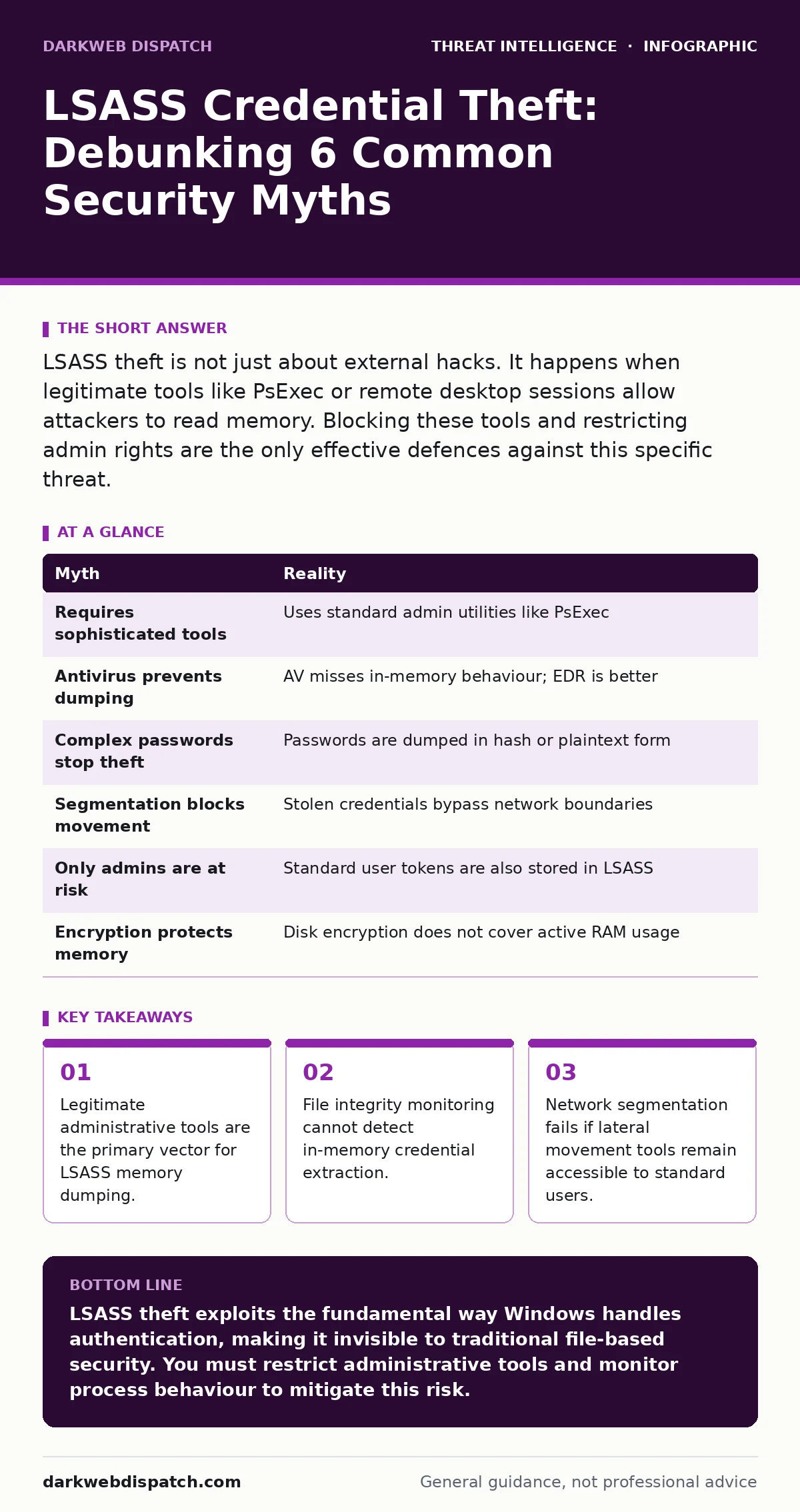
Summary of Myths and Realities
| Myth | Reality |
|---|---|
| Requires sophisticated tools | Uses standard admin utilities like PsExec |
| Antivirus prevents dumping | AV misses in-memory behaviour; EDR is better |
| Complex passwords stop theft | Passwords are dumped in hash or plaintext form |
| Segmentation blocks movement | Stolen credentials bypass network boundaries |
| Only admins are at risk | Standard user tokens are also stored in LSASS |
| Encryption protects memory | Disk encryption does not cover active RAM usage |
Key takeaways
- Legitimate administrative tools are the primary vector for LSASS memory dumping.
- File integrity monitoring cannot detect in-memory credential extraction.
- Network segmentation fails if lateral movement tools remain accessible to standard users.
LSASS theft exploits the fundamental way Windows handles authentication, making it invisible to traditional file-based security. You must restrict administrative tools and monitor process behaviour to mitigate this risk.
Frequently asked questions
How do I know if LSASS has been dumped on my system?
Look for unusual processes attaching to lsass.exe or sudden spikes in memory usage by administrative tools. Check for new files in temporary directories that contain credential data.
Can Windows Defender prevent LSASS dumping?
Windows Defender can detect some known dumping tools via behavioural analysis, but it is not foolproof. It may miss custom scripts or living-off-the-land techniques.
Is disabling LSASS a viable defence?
No. LSASS is critical for Windows authentication. Disabling it will break user logins and system security. You must protect the process, not remove it.
How does this relate to threat intelligence reports?
Reports often highlight the prevalence of living-off-the-land techniques. Understanding this helps you prioritise monitoring for standard tools rather than just malware.
How this guide was produced: written by the DarkWeb Dispatch editorial team with AI assistance, checked against the public references listed below, and reviewed when the facts change. See our editorial policy or report an error.