What is Data Leaks: How Information Escapes and How to Stop It
Most data leaks stem from human error and misconfigured systems rather than sophisticated hacking, making simple configuration checks more effective than complex security tools.
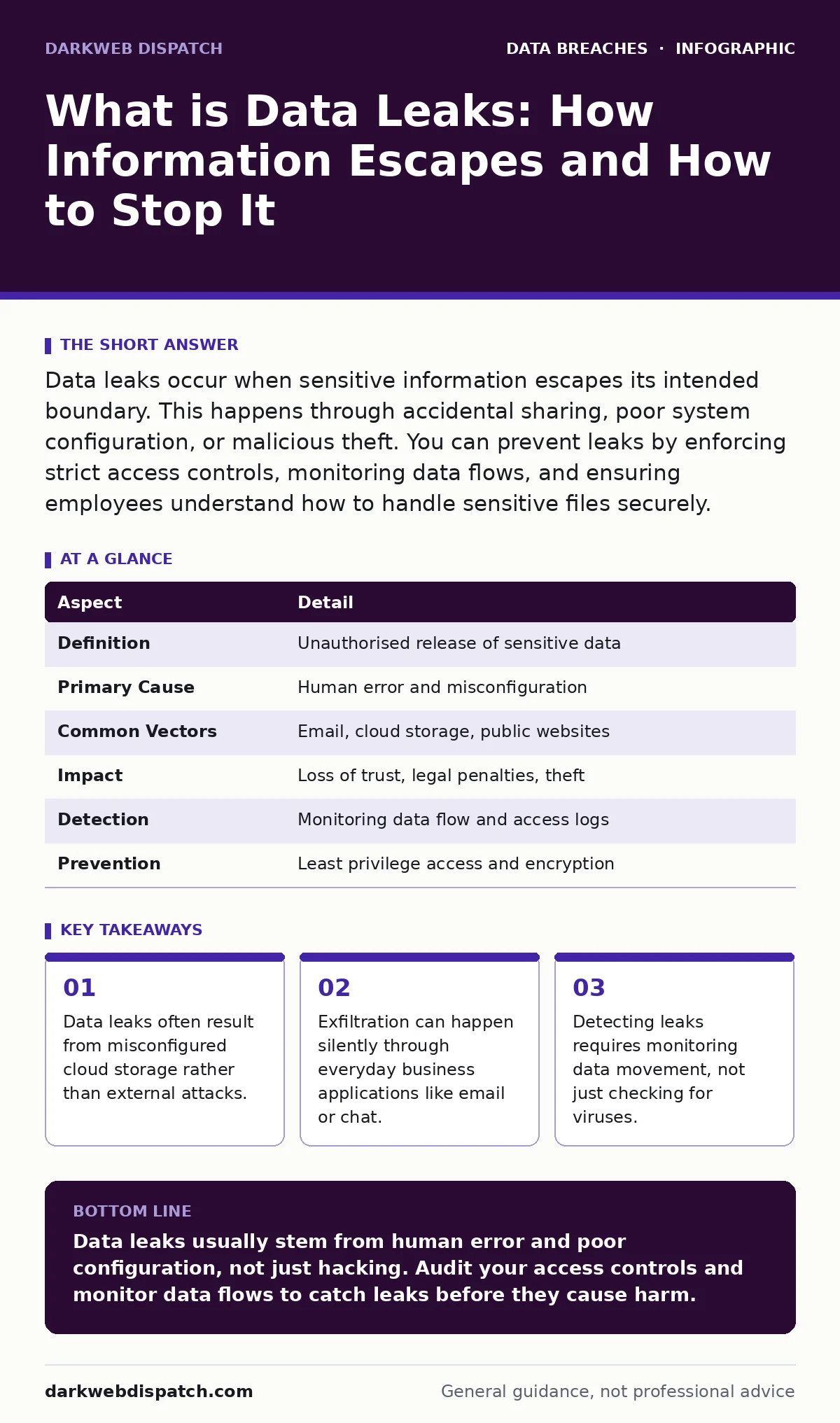
Data leaks occur when sensitive information escapes its intended boundary. This happens through accidental sharing, poor system configuration, or malicious theft. You can prevent leaks by enforcing strict access controls, monitoring data flows, and ensuring employees understand how to handle sensitive files securely.
What is data leaks
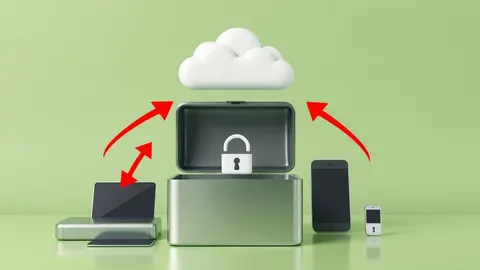
Imagine leaving your diary open on a park bench. Anyone walking by can read your private thoughts. Data leaks work the same way in the digital world. They occur when sensitive information moves from a secure environment to an unauthorised place. This movement might be accidental, like sending an email to the wrong person, or intentional, like a thief stealing files. The core problem is the same: information ends up where it should not be.
Data leaks differ from general security failures because they specifically involve the exposure of data. A system might be hacked without any data leaving, but that is not a leak. A leak requires the actual transfer of information to an unauthorised recipient. This distinction matters because the prevention strategies differ. You stop hacks by hardening walls. You stop leaks by controlling who can take things out.
| Aspect | Detail |
|---|---|
| Definition | Unauthorised release of sensitive data |
| Primary Cause | Human error and misconfiguration |
| Common Vectors | Email, cloud storage, public websites |
| Impact | Loss of trust, legal penalties, theft |
| Detection | Monitoring data flow and access logs |
| Prevention | Least privilege access and encryption |
How data leaks work
Data leaks usually follow a simple path. First, an attacker or an employee gains access to the data. This access might be legitimate, such as an employee needing files for work. Second, the data is extracted. This extraction can happen through copying files to a USB drive, uploading them to a personal cloud account, or printing them. Third, the data is transmitted outside the secure network. This transmission often uses standard channels like email or web uploads, which makes it hard to spot.
Many organisations focus on keeping attackers out. They build high walls and use strong firewalls. This approach ignores the inside threat. If an employee has full access to all customer records, they can leak data without breaking any rules. The system sees a legitimate user accessing files. It does not see a leak until the data arrives at an external destination. This is why internal controls matter more than external defences for leak prevention. You must limit what each person can see and do. See the guide on role-based access control for details on limiting permissions.
Who data leaks affect
Data leaks affect every organisation that holds sensitive information. This includes hospitals, banks, schools, and small businesses. The impact depends on what data is leaked. Personal identification numbers, health records, and financial details are high value. Attackers use this data for identity theft or fraud. See the guide on synthetic identity fraud to understand how stolen data creates fake identities.
Organisations suffer reputational damage when leaks occur. Customers lose trust. They worry their private information is unsafe. This loss of trust can lead to lost business. Legal consequences also follow. Many regions have strict laws about data protection. Fines can be heavy. Employees also face stress. They worry about their jobs and their personal liability. The ripple effect touches everyone involved in the data lifecycle.
What people usually get wrong
Many people believe data leaks only happen due to hacking. This belief is dangerous. Most leaks are caused by mistakes. An employee sends a spreadsheet to the wrong email address. A developer accidentally commits code containing passwords to a public repository. A cloud storage bucket is left open to the world. These errors are common and preventable. Focusing only on hackers leaves these easy entry points wide open.
Another mistake is assuming encryption solves everything. Encryption protects data at rest and in transit. It makes stolen files unreadable without the key. However, encryption does not stop the data from leaving. If an encrypted file is sent to the wrong person, it is still a leak. The recipient might not open it, but the exposure has happened. Encryption is a shield, not a lock on the door. You still need to control who walks out. See the guide on secrets management for better ways to handle sensitive credentials.
Detecting data leaks
Detecting leaks requires watching data movement. You cannot rely on antivirus software alone. Antivirus looks for known malware signatures. It does not know if a file is sensitive. You need data loss prevention tools. These tools scan files for patterns like credit card numbers or national ID numbers. They block transfers that match these patterns.
Logging is also critical. Every access to sensitive data should be recorded. Who accessed the file? When? From where? If an employee downloads thousands of records at 3am, the logs will show this anomaly. Automated systems can alert security teams to unusual behaviour. This allows quick response before the data leaves the network. Regular audits of access logs help identify weak spots. You might find that certain users have more access than they need. Reducing this access lowers the risk. See the guide on unauthorized access for more on identifying suspicious logins.
See also: Data Breach Costs Explained: Why the Hidden Bills Outstrip the Headlines
Preventing accidental leaks
Human error is the biggest cause of leaks. Training helps, but it is not enough. People get tired and make mistakes. You need technical controls to catch errors. Email filters can warn users before they send sensitive data externally. Cloud storage policies can prevent public sharing of internal folders. These controls act as a safety net.
Clear policies are also necessary. Employees must know what data is sensitive. They must know how to share it safely. Simple rules work best. Do not use personal email for work. Do not share files via public links. Use approved secure channels. Regular reminders keep these rules fresh. Culture matters. If employees feel comfortable reporting mistakes, you can fix them before they become leaks. Hiding mistakes makes them worse.
Handling a leak
When a leak is discovered, act quickly. Isolate the source. Stop the data from flowing further. If it was an email, recall it if possible. If it was a cloud link, delete it immediately. Notify the affected parties. Transparency builds trust. Let them know what was lost and what you are doing to fix it.
Assess the damage. What data was exposed? Who has it? Determine the legal requirements. You may need to report the incident to regulators. Review your controls. Why did the leak happen? Was it a policy gap? A configuration error? Fix the root cause. Update your training. Adjust your technical controls. Learn from the incident. Every leak is a lesson. Ignoring the lesson guarantees a repeat. See the guide on data breach costs to understand the financial impact of poor response.
Long term resilience
Building resilience takes time. You must continuously improve your defences. Technology changes. Attack methods evolve. Your controls must adapt. Regular testing helps. Simulate leaks to see if your detection works. Test your response plans. Ensure your team knows what to do.
Focus on least privilege. Give users only the access they need. Review access regularly. Remove access when jobs change. This limits the damage of any single mistake. Encrypt data wherever possible. Use strong keys. Manage keys securely. See the guide on credential leaks for how exposed passwords worsen data loss. Combine these measures for a strong defence. No single tool stops all leaks. Layered security provides the best protection.
See the guide on misconfigured cloud storage leaks to learn how to harden your cloud environment against accidental exposure.
Key takeaways
- Data leaks often result from misconfigured cloud storage rather than external attacks.
- Exfiltration can happen silently through everyday business applications like email or chat.
- Detecting leaks requires monitoring data movement, not just checking for viruses.
Data leaks usually stem from human error and poor configuration, not just hacking. Audit your access controls and monitor data flows to catch leaks before they cause harm.
Frequently asked questions
Can I stop all data leaks?
No, you cannot stop all leaks. You can reduce risk significantly by using strong controls and monitoring, but human error and system flaws will always exist.
What is the difference between a data leak and a data breach?
A data breach is a security incident that compromises a system. A data leak is the actual exposure of data. A breach can happen without a leak, but a leak is always a breach of confidentiality.
How do I know if my data has leaked?
Monitor your logs for unusual activity. Use data loss prevention tools. Check public sources for your sensitive data. If you see unexpected external access, investigate immediately.
Should I use a VPN to prevent leaks?
A VPN encrypts your connection, protecting data in transit. It does not stop you from sending data to the wrong person or misconfiguring storage. It is one layer of defence, not a complete solution.
How this guide was produced: written by the DarkWeb Dispatch editorial team with AI assistance, checked against the public references listed below, and reviewed when the facts change. See our editorial policy or report an error.