Detect Firmware Vulnerabilities: Signals, Tools and Blind Spots
Firmware flaws hide in hardware logic, making them invisible to standard operating system security scans and requiring specialised detection methods.
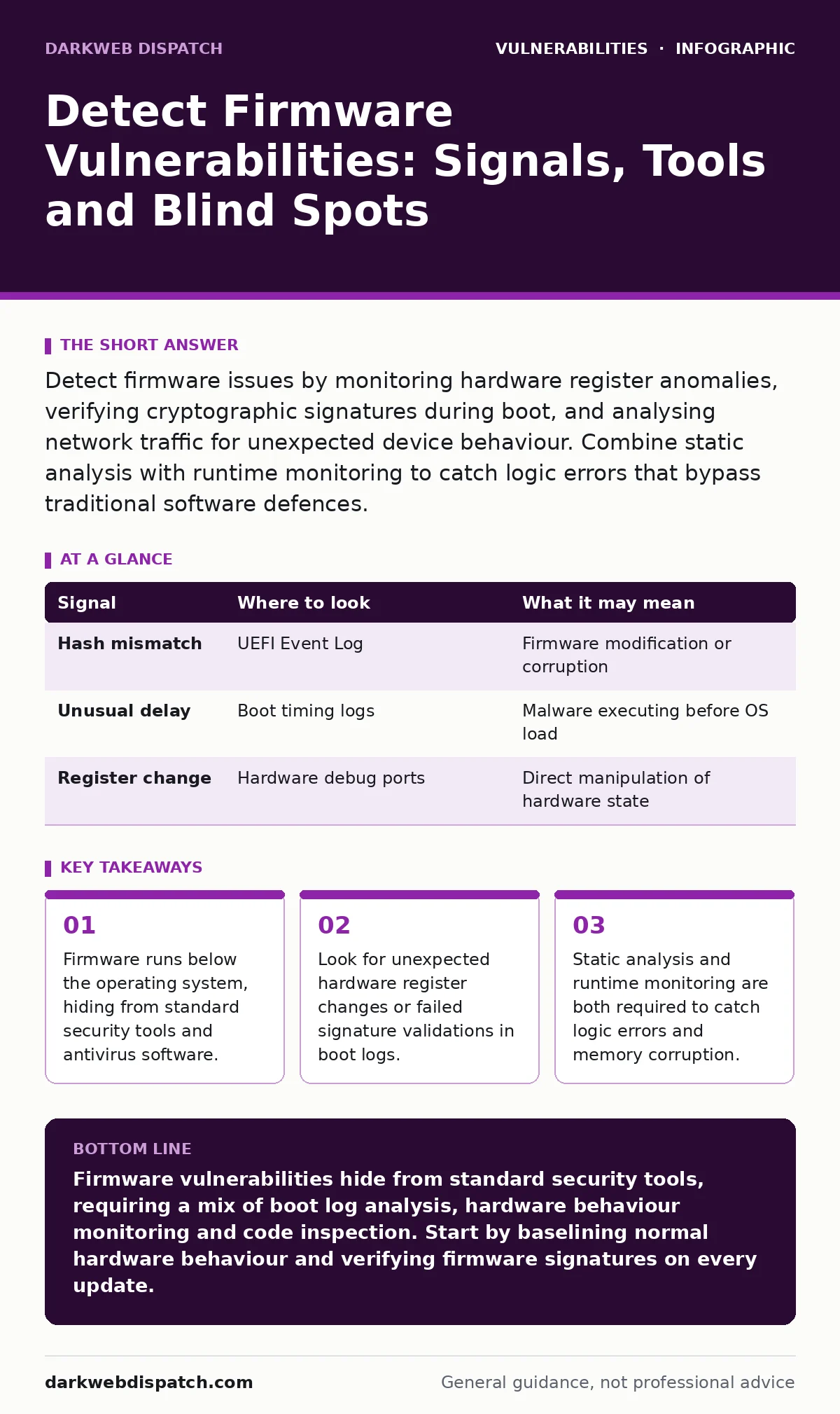
Detect firmware issues by monitoring hardware register anomalies, verifying cryptographic signatures during boot, and analysing network traffic for unexpected device behaviour. Combine static analysis with runtime monitoring to catch logic errors that bypass traditional software defences.
The Hardware Layer Blind Spot
Firmware resides in non-volatile memory on hardware components. It operates before the operating system loads, giving it control over hardware functions. Standard security tools scan the operating system and applications. They cannot see the code running in the firmware layer. This creates a significant blind spot in your security posture.
Imagine a server where the operating system is fully patched. The firmware on the network card contains a flaw. An attacker exploits this flaw to intercept network traffic. The operating system logs show no error. The intrusion happens below the visibility of your security stack.
Boot Sequence Artifacts
The boot process is the first place to look for anomalies. Firmware executes a chain of code to initialise hardware. Each step should be verified against a known good state. This is called a measured boot. If a measurement fails, the system should halt or log the error.
Look for failed signature validations in the boot logs. These logs are often stored in the UEFI event log. A mismatched hash indicates the firmware has been modified. It could be a legitimate update or a malicious implant. You must verify the source of the change.
| Signal | Where to look | What it may mean |
|---|---|---|
| Hash mismatch | UEFI Event Log | Firmware modification or corruption |
| Unusual delay | Boot timing logs | Malware executing before OS load |
| Register change | Hardware debug ports | Direct manipulation of hardware state |
Runtime Hardware Behaviour
Firmware continues to run while the operating system is active. It manages power states, thermal controls and peripheral communication. Look for unexpected changes in hardware registers. These changes can indicate an attacker is manipulating device behaviour.
Monitor for devices that change their reported identity. A network card that suddenly claims a different vendor ID is suspicious. This is often a sign of a firmware implant. The implant changes the device signature to avoid detection.
Check for excessive power consumption in idle states. Firmware can be hijacked to create a crypto-mining operation. This draws power from the device without using the CPU. The heat output increases while the system load remains low.
Network Traffic Anomalies
Firmware controls how devices communicate on the network. It handles low-level packet processing. Look for traffic patterns that do not match the device function. A printer sending large data packets to an external server is unusual.
Imagine a smart thermostat sending encrypted data to an unknown IP address. The operating system network monitor may not see this traffic. The firmware handles the connection directly. This is a direct hardware-to-network bypass.
Use network packet capture tools to analyse this traffic. Look for protocols that the device should not support. A basic sensor should not be running web servers. Unexpected protocol activity suggests the firmware has been compromised.
Static Analysis Techniques
Static analysis examines the firmware code without running it. You need the firmware binary to perform this analysis. Most vendors do not provide the source code. You must extract the binary from the device.
Look for hardcoded credentials in the binary. These are passwords or keys embedded in the code. Attackers use these to gain initial access. Also look for disabled security features. A firmware with debug ports enabled is vulnerable.
See also: How to Spot JWT Vulnerabilities Before They Breach Your System · Prevent Microsoft Exchange Vulnerabilities: Priority Measures
Dynamic Analysis and Emulation
Dynamic analysis runs the firmware in a controlled environment. This allows you to observe its behaviour in real time. You can use hardware emulators for this. The emulator mimics the hardware the firmware expects.
Look for memory access violations. Firmware often lacks the memory protection of modern operating systems. A buffer overflow in firmware can crash the device or allow code execution. This is similar to use-after-free vulnerabilities in software.
Monitor for unexpected network connections during emulation. The firmware may try to phone home. This reveals command and control channels. It also shows which external services the device depends on.
Common Blind Spots
Many teams focus on the operating system and ignore the hardware. This is the biggest blind spot. Firmware updates are often manual and infrequent. This leaves known vulnerabilities unpatched for years.
Another blind spot is the supply chain. Firmware may contain components from third parties. These components may have their own vulnerabilities. You need to verify the integrity of all firmware components.
Do not rely on vendor security advisories alone. Vendors may not disclose all vulnerabilities. They may also delay patches for business reasons. You must perform your own assessment.
Integrating Detection Methods
No single method detects all firmware vulnerabilities. You must combine static and dynamic analysis. You must also monitor runtime behaviour. This creates a layered defence strategy.
Start by establishing a baseline of normal behaviour. Record the boot times, network traffic and power consumption. Use this baseline to detect anomalies. Any deviation from the baseline requires investigation.
Regularly update your firmware. But do not trust the update process blindly. Verify the signature of the update package. Ensure the update comes from a trusted source. This prevents the installation of malicious firmware.
Related topics such as out-of-band patches can help when a vendor releases a critical fix. You may need to apply these patches outside the normal update cycle. Understanding input validation is also key, as firmware often processes raw data from hardware.
Consider the risk of IoT device vulnerabilities. Many IoT devices have weak firmware security. They are easy targets for attackers. Implement network segmentation to limit their access.
Key takeaways
- Firmware runs below the operating system, hiding from standard security tools and antivirus software.
- Look for unexpected hardware register changes or failed signature validations in boot logs.
- Static analysis and runtime monitoring are both required to catch logic errors and memory corruption.
Firmware vulnerabilities hide from standard security tools, requiring a mix of boot log analysis, hardware behaviour monitoring and code inspection. Start by baselining normal hardware behaviour and verifying firmware signatures on every update.
Frequently asked questions
Can antivirus software detect firmware malware?
Standard antivirus software cannot detect firmware malware. It operates at the operating system level and cannot see the hardware layer. You need specialised tools for firmware analysis.
How often should I check for firmware updates?
You should check for firmware updates regularly. However, do not install them immediately. Verify the signature and test them in a controlled environment first. This prevents the installation of flawed or malicious updates.
Is static analysis enough to find vulnerabilities?
Static analysis is not enough. It can find hardcoded credentials and disabled features. But it cannot detect logic errors or runtime exploits. You need dynamic analysis to observe the firmware in action.
What is the risk of a bricked device?
A bricked device is unusable. It cannot boot or perform its function. This happens if the firmware is corrupted during an update. Always keep a backup of the working firmware before updating.
How this guide was produced: written by the DarkWeb Dispatch editorial team with AI assistance, checked against the public references listed below, and reviewed when the facts change. See our editorial policy or report an error.