MFA Mistakes in Cloud Accounts and How to Fix Them
Most MFA failures occur not because the technology is broken, but because the implementation bypasses the authentication step for machine-to-machine traffic.
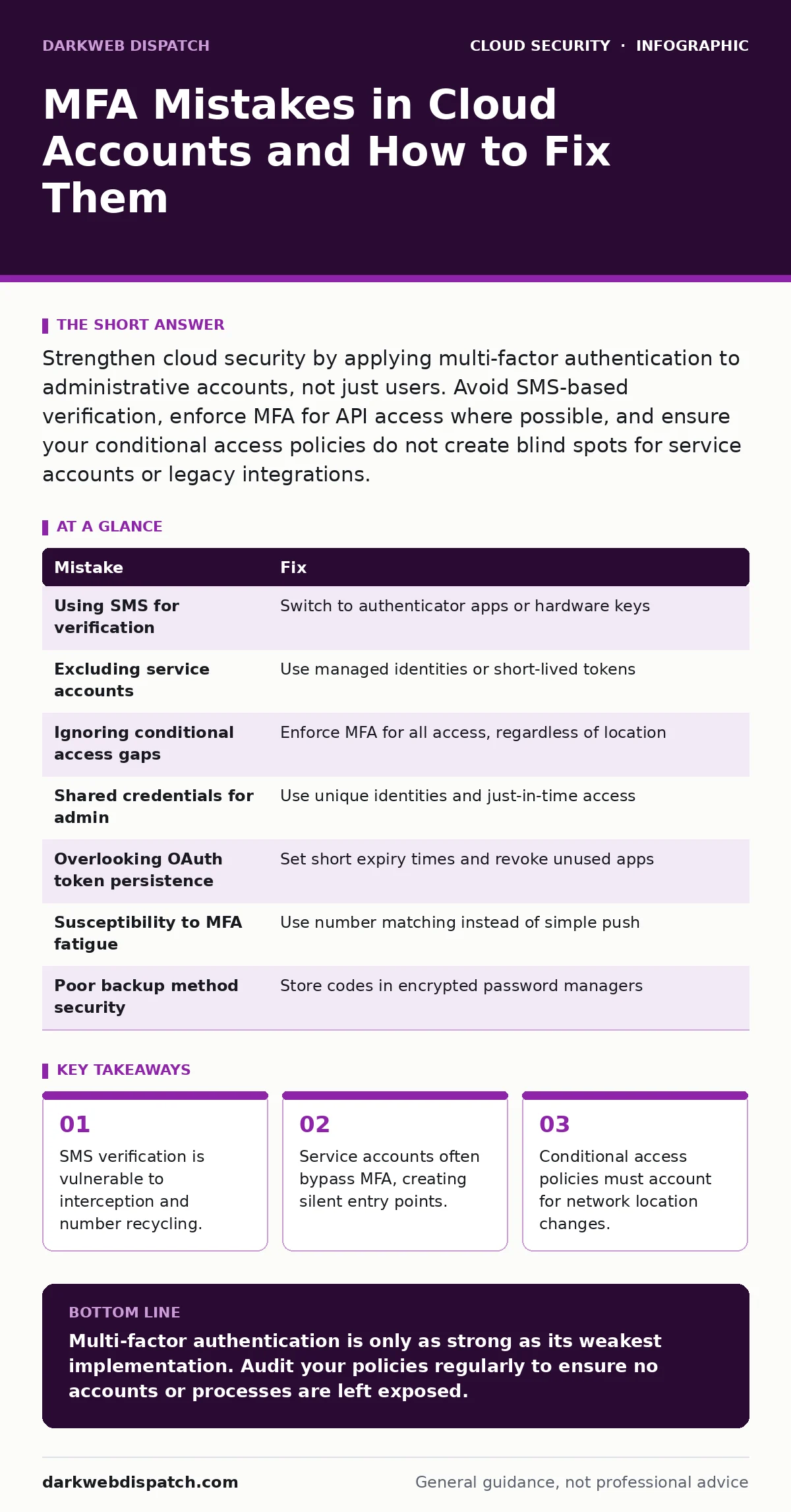
Strengthen cloud security by applying multi-factor authentication to administrative accounts, not just users. Avoid SMS-based verification, enforce MFA for API access where possible, and ensure your conditional access policies do not create blind spots for service accounts or legacy integrations.
Mistake 1: Relying on SMS for Verification
Many organisations choose short message service as the default second factor because it requires no additional hardware. Users receive a code via text and enter it to prove their identity. This convenience comes with a severe structural weakness in the telecommunications network.
Why it hurts:
Mobile numbers are not unique identifiers. They can be transferred to new owners when a contract ends, a process known as number recycling. Attackers can also intercept these codes through social engineering of carrier staff or by exploiting signalling protocol flaws. If an attacker knows your number and your password, they can often reset your MFA to their own device.
The fix:
Enforce an application-based authenticator or a hardware security key. These methods bind the verification to a specific device or cryptographic key rather than a mutable phone number. Application tokens generate codes locally, removing the dependency on the mobile network. For high-privilege accounts, consider a FIDO2 security key, which provides phishing-resistant authentication through public-key cryptography.
Mistake 2: Excluding Service Accounts from Policy
Administrators often exclude automated service accounts from mandatory multi-factor authentication rules. These accounts run scripts, deploy infrastructure, or access databases without human interaction. The assumption is that machines cannot perform the interactive steps required by MFA.
Why it hurts:
Service accounts frequently hold high levels of privilege to perform their tasks. If an attacker compromises the credentials of a service account, they gain immediate access to cloud resources without triggering a second factor check. This creates a silent backdoor that bypasses your primary defence layer. The lack of human interaction means there is no one to notice the unusual activity until significant damage has occurred.
The fix:
Replace static passwords for service accounts with managed identities or short-lived access tokens. Managed identities allow the cloud platform to authenticate the service on your behalf, eliminating the need for long-term secrets. Where static credentials are unavoidable, store them in a secrets manager and restrict access using the principle of least privilege. Ensure these accounts are monitored for anomalous usage patterns.
Mistake 3: Ignoring Conditional Access Gaps
Conditional access policies define when and where MFA is required. A common error is configuring rules that only enforce MFA for external network connections. Internal corporate networks are treated as trusted zones where single-factor authentication is permitted.
Why it hurts:
If an attacker compromises a device inside your trusted network, they can access cloud resources without triggering MFA. This assumes that the network perimeter is secure, a premise that has eroded with the rise of remote work and cloud adoption. An attacker on the same network as your users can intercept traffic or use a compromised laptop to access data silently.
The fix:
Implement a zero-trust approach where identity, not network location, dictates access. Require MFA for all access to sensitive cloud resources, regardless of the IP address. Use device compliance signals to verify that the connecting device meets security standards. This ensures that even if an attacker is on your network, they cannot access resources without valid credentials and a second factor.
Mistake 4: Using Shared Credentials for Emergency Access
Teams often create shared accounts for administrative tasks or emergency break-glass scenarios. Multiple people know the password and the MFA backup codes. This practice eliminates individual accountability and creates a single point of failure.
Why it hurts:
When an account is shared, you cannot determine who performed an action. If the credentials are leaked, revoking access is difficult because you do not know who else has them. Backup codes are often stored in plain text on shared drives or sticky notes. An attacker who finds these codes can maintain persistent access even after you change the password.
The fix:
Assign unique identities to every user. For emergency access, use a privileged access management solution that provides just-in-time elevation. This grants temporary admin rights for a limited duration, after which access is automatically revoked. All actions are logged to the individual’s identity, creating a clear audit trail. This approach balances security with operational necessity.
Mistake 5: Overlooking OAuth Token Persistence
Many users believe that logging out ends their session. In cloud environments, applications often use OAuth tokens to maintain access. These tokens can remain valid for extended periods, even after the user closes their browser.
Why it hurts:
If an attacker steals a valid OAuth token, they can impersonate the user without needing to re-authenticate. This bypasses MFA entirely because the token already represents a verified session. This risk is heightened when users grant excessive permissions to third-party applications. The attacker can perform actions that the user originally authorised, such as reading emails or accessing files.
The fix:
Implement strict token expiry times and revoke permissions for unused applications regularly. Educate users to review connected apps in their cloud account settings. For high-security environments, consider requiring MFA for sensitive operations even when a valid token exists. This adds a layer of protection against token theft and misuse.
See also: Policy as Code: Definition, Purpose and Practical Cloud Security · Bot Management FAQs: Distinguishing Humans from Automated Traffic
Mistake 6: Failing to Monitor MFA Fatigue Attacks
Attackers may not need to guess your password. They can trigger a flood of MFA push notifications to your device. The goal is to annoy you into approving a request by mistake, a tactic known as MFA fatigue or MFA bombing.
Why it hurts:
In the heat of the moment, users may approve a notification without checking the details. This grants the attacker access to the account. The attack exploits human psychology rather than technical vulnerabilities. Once approved, the attacker gains full control, and the user may not realise they have been compromised.
The fix:
Disable simple push notifications in favour of number matching or typed codes. Number matching requires the user to enter a code displayed on the screen into their authenticator app. This ensures the user is actively verifying the request. Educate users to never approve notifications they did not initiate. Monitor for rapid, failed MFA attempts and block suspicious source IPs.
Mistake 7: Neglecting Backup Methods Security
Users often print backup codes or store them in digital notes for recovery purposes. These codes are often treated as less sensitive than the primary password. They sit in unencrypted files or on physical paper that can be lost or stolen.
Why it hurts:
Backup codes are permanent keys to your account. If an attacker obtains them, they can bypass MFA indefinitely. Unlike time-based tokens, these codes do not expire. A single leaked backup code can provide persistent access, rendering your MFA strategy ineffective. The damage can go unnoticed for months, especially if the account is used for low-frequency activities.
The fix:
Store backup codes in a reputable password manager with strong encryption. Treat them with the same security level as your primary credentials. Regularly rotate these codes if your platform allows it. Consider using hardware keys as the primary recovery method, as they are difficult to steal remotely.
Summary of MFA Mistakes
| Mistake | Fix |
|---|---|
| Using SMS for verification | Switch to authenticator apps or hardware keys |
| Excluding service accounts | Use managed identities or short-lived tokens |
| Ignoring conditional access gaps | Enforce MFA for all access, regardless of location |
| Shared credentials for admin | Use unique identities and just-in-time access |
| Overlooking OAuth token persistence | Set short expiry times and revoke unused apps |
| Susceptibility to MFA fatigue | Use number matching instead of simple push |
| Poor backup method security | Store codes in encrypted password managers |
The complexity of cloud security means that mistakes often compound. A single weak link, such as a shared admin account, can undermine the security of the entire environment. By addressing these common pitfalls, you create a more resilient defence posture.
For further reading on related topics, consider exploring guides on single sign-on to streamline identity management, or microsegmentation to limit lateral movement. Understanding OAuth token abuse can also help you secure third-party integrations. Additionally, reviewing best practices for cloud backup ensures you can recover from incidents that bypass your defences.
Key takeaways
- SMS verification is vulnerable to interception and number recycling.
- Service accounts often bypass MFA, creating silent entry points.
- Conditional access policies must account for network location changes.
Multi-factor authentication is only as strong as its weakest implementation. Audit your policies regularly to ensure no accounts or processes are left exposed.
Frequently asked questions
Can I use biometrics for MFA in the cloud?
Yes, if the biometric data is stored locally on the device and used to unlock a secure key or authenticator app. This is more secure than sending biometric data to a server.
Does MFA protect against password leaks?
It significantly reduces the risk. Even if an attacker has your password, they cannot access your account without the second factor. However, it does not protect against session hijacking or token theft.
How often should I review MFA settings?
At least annually, or whenever there is a significant change in your cloud architecture. Regular reviews help identify new vulnerabilities or policy gaps.
Is MFA mandatory for all cloud services?
It is highly recommended for any service that holds sensitive data or provides administrative access. Most industry standards now require MFA for cloud accounts.
How this guide was produced: written by the DarkWeb Dispatch editorial team with AI assistance, checked against the public references listed below, and reviewed when the facts change. See our editorial policy or report an error.